
How to Make a Digital Wedding Guest Book

Updated: Jul 3

We’ve seen some of the best wedding moments arrive from guests rather than the official camera.
A friend records the flower girl practising her walk. Someone at the back table captures the whole room during the first dance. A cousin uploads six versions of the same group selfie, and one of them miraculously includes everyone’s full face.
These are the photos and videos couples often don’t know exist until someone remembers to send them weeks later. By then, they’re scattered across camera rolls, text threads, and group chats.
A digital wedding guest book gives everyone one place to share those moments, along with messages and wedding wishes for the couple.
Setting one up is easy. Getting guests to stop, scan, and contribute takes a little more planning.
A QR code gives people access to the guest book. Clear prompts, good timing, and an effortless upload process give them a reason to use it.
Here’s how to bring those pieces together.
What is a digital wedding guest book?
A digital wedding guest book collects messages and media from your guests online rather than limiting them to signatures in a physical book.
Depending on how you set it up, guests can contribute:
Written wedding wishes
Recorded video messages
Photos from the ceremony and reception
Candid video clips
Marriage advice
Favourite memories
Moments you may not have seen yourself
Guests scan a wedding QR code or open a private link on their phone. Their contributions are then gathered in one place for the couple to view, organize, and save.

With VidDay Digital Guestbooks, those photos, clips, and messages can also be arranged into a wedding guest book video with music and a wedding theme.
Decide what you want guests to contribute
Before creating your guest book, decide what you’d like to collect.
You can leave the invitation broad and ask guests to share anything from the day. That works well when your priority is gathering candid photos and clips from different parts of the wedding.
A more specific request can produce stronger contributions, especially when you want personal messages rather than another collection of dance-floor footage.
You could ask guests to:
Record a short message for the couple
Share a favourite memory
Offer one piece of marriage advice
Upload their best photo from the wedding
Capture a moment the couple may have missed
Make a prediction about the couple’s life in ten years
Share an idea for their first anniversary
A blank request makes guests decide what to say before they can say it. A prompt removes that first hurdle.
You don’t need to use the same prompt everywhere. A card at the reception table could ask for photos from the evening, while a link sent to close family before the wedding could invite longer video messages.
How to create a digital wedding guest book with VidDay
VidDay gives you a private event page where guests can upload wedding photos, videos, and messages.
Here’s how the process works.
1. Set up the guest book before the wedding
Start a new VidDay and select the Digital Guestbook option.
Add the couple’s names and choose when you’d like the finished video to be ready. VidDay will create an event page where all guest contributions are collected.
You’ll also receive a unique wedding QR code and print-ready cards that can be displayed at the venue.
Setting everything up early gives you time to test the code, plan where it will appear, and introduce the guest book before the reception begins.
2. Give guests simple instructions
Guests shouldn’t have to stop and figure out what a QR code is for while holding a drink and looking for their table.
Place one clear instruction beside it, such as:
Scan to share your wedding photos and videos
Leave a video message for the newlyweds
Help us capture the moments we missed
Scan with your phone camera and upload your favourite photo
It also helps to mention that no app is required. With VidDay, guests can scan the code, open the private contribution page in their browser, and upload from their phone or another device.
That reassurance removes a common concern before it becomes a reason to skip contributing.
3. Display the QR code where guests pause
A welcome table feels like an obvious place for a QR code, but guests tend to move through the entrance quickly.
They’re greeting people, checking the seating chart, removing coats, or beginning the ancient wedding ritual of locating the bar.
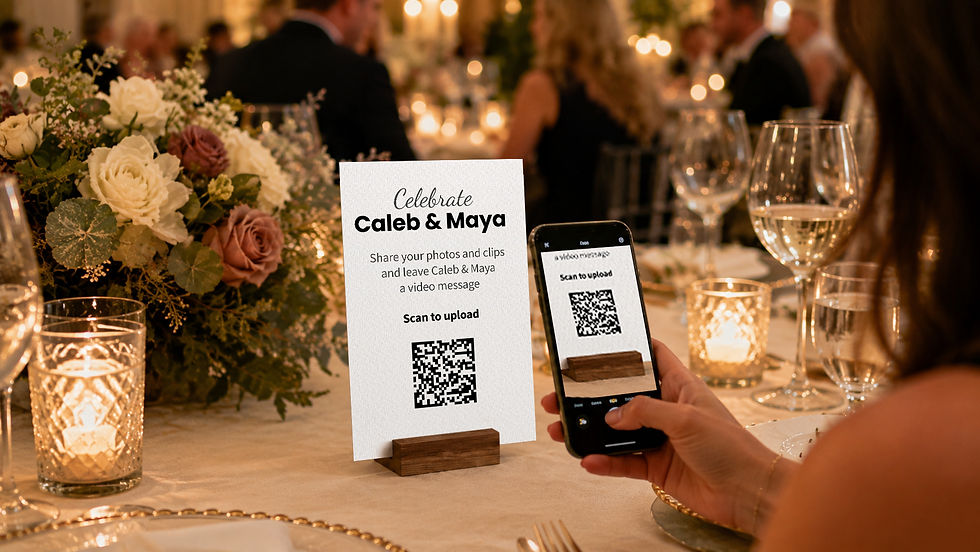
Place additional QR-code cards where guests naturally spend time. The best location also depends on what you’re asking them to share.
Match each location with a prompt that makes sense in the moment:
Reception tables
Share a favourite memory or one piece of marriage advice.
Photo booth
Upload your favourite photo from tonight.
Bar or lounge area
Share a candid photo of the celebration.
Near the dance floor
Capture a dance, toast, or moment the couple may have missed.
Guest book or gift table
Record a short message for the newlyweds.
Guests are more likely to respond when the request matches what they’re already doing.
Someone standing near the photo booth has a photo ready to share. Someone sitting at dinner has more time to think about a message.
Put the QR code where guests pause, not only where they pass.
You can also display it inside the wedding program, near the dessert table, or anywhere guests are likely to have a few quiet moments.
For more placement and printing ideas, read our guide to using a QR code for a wedding guest book.
4. Mention the guest book during the reception
Signs are easy to miss, especially once dinner, speeches, music, and conversations begin competing for attention.
Ask the DJ, MC, wedding planner, or a member of the wedding party to mention the guest book at a moment when guests can act on the request.
Cocktail hour, the beginning of dinner, and the transition into dancing can all work. The announcement should explain what guests can share and where they’ll find the code.
For example:
“Don’t forget to share the photos and videos you take tonight. Scan the QR code on your table to upload them for the couple. You can also leave them a short video message.”
That gives guests a specific action instead of simply informing them that a digital guest book exists somewhere in the room.
You can also ask one outgoing friend or family member to encourage participation throughout the evening. They don’t need to patrol the reception with a clipboard.
A few personal reminders can help relatives who didn’t notice the signs or aren’t confident using QR codes.
5. Make room for imperfect contributions
Wedding guests aren’t professional videographers, and that’s part of the value.
Someone may laugh halfway through a message. A friend might record from a noisy hallway. A relative could upload a slightly crooked photo that catches an expression the photographer missed.
Those contributions show the wedding from inside the celebration.

Guests can help by keeping recorded messages short, finding a reasonably quiet spot, and holding their phones steady. Still, avoid making the instructions feel like a production brief. The easier and more relaxed the request feels, the more likely people are to participate.
Professional wedding photography documents the day with care and consistency. Guest contributions add the smaller interactions happening around it.
Together, they create a fuller view of the wedding.
6. Keep collecting after the wedding
Guests may take dozens of photos during the reception and upload none of them that night.
That doesn’t mean they weren’t interested. Weddings are busy, and sharing files may not become a priority until the following morning.
VidDay makes the follow-up simple because you can send guests the same private contribution link by text, email, or through your wedding website. They can open it in their browser and upload photos, videos, or messages without downloading an app or creating an account.
Include a specific deadline so the request doesn’t get buried beneath everyone’s post-wedding camera roll.
For example:
“Did you take photos or videos at our wedding? Help us finish our wedding video by Sunday by adding your favourites through our private link.”
A deadline gives guests a clear reason to act now, while the wedding is still fresh and their photos are easy to find.
You can send the link through:
A thank-you email
The wedding website
A group text
A message from the wedding party
A post-wedding photo request
Keeping the upload window open for several days gives guests time to contribute without leaving the collection unfinished indefinitely.
How to get more wedding guest book contributions
Participation improves when guests encounter the guest book more than once.
A simple plan could look like this.
Before the wedding
Add the link to your wedding website and invite close family or members of the wedding party to record messages in advance.
During the reception
Display the QR code in several useful locations and ask the MC to mention it once or twice.
After the wedding
Send the private link and give guests a few days to upload anything still sitting on their phones.
This works better than relying on one sign near the entrance to carry the entire project.
We’ve seen that contributors are more comfortable when they know exactly what’s being requested.
“Share something for the couple” can feel broad.
“Upload your favourite photo from tonight” gives them somewhere to begin.
What should you do with the contributions?
Once your collection period ends, review the uploaded photos, clips, and messages.
You may find several versions of the same moment, along with contributions that show completely different parts of the wedding.
One table may have documented the speeches. Friends near the dance floor may have captured the celebration after dinner. Family members could have recorded messages before the ceremony even began.
With VidDay, everything is collected in one secure place. You can arrange the contributions, add music, choose a wedding theme, and preview the finished video before sharing it.
The couple can watch the video privately, send it to guests, download it, or watch it with family and the wedding party after the celebration.

Physical keepsakes, including a Video Book, DVD, or USB, can also turn the finished wedding video into something the couple can open and replay later.
For more ideas about organizing messages and photos into a finished video, visit our wedding video gift guide.
Should you still have a traditional wedding guest book?
You don’t have to choose only one format.
Our guide to digital vs. traditional wedding guest books explains what each format preserves and why using both can create a fuller record of the wedding.
A physical guest book gives guests a familiar place to leave handwritten notes and signatures. A digital guest book can collect the photos, voices, and moving moments that paper can’t hold.
Using both works well when handwriting matters to you but you also want contributions from guests who can’t attend or media from throughout the day.
A digital-only guest book makes sense when you want:
Photos and videos alongside written messages
Contributions from remote guests
One link that can stay open after the wedding
A guest book that can become a video
Something easy to share with friends and family
The best format depends on what you hope to revisit after the wedding.
Make contributing part of the celebration
A digital wedding guest book shouldn’t feel like one more item guests are expected to complete.
Set it up before the wedding. Tell people what you’d love them to share. Put the QR code where they have time to notice it, and give them another opportunity after the reception.
That’s how the guest book becomes part of the day rather than a sign everyone walked past.
When contributing is easy, visible, and specific, guests can help preserve the wedding from dozens of perspectives, including moments the couple never knew were happening.

